Road Designer
Lay out roads, junctions and one-way streets so the traffic flows smoothly, then watch the cars follow the network you designed, level by level.
Read more about Road DesignerMore strategy games
All strategy 1942 Pacific FrontStrategy
 1941 Frozen FrontStrategy
 Merge Battle TacticsStrategy
 4 Colors MultiplayerStrategy
 Plants vs Zombies Fusion ModeStrategy
 Tower DefenseStrategy
 Master Chess MultiplayerStrategy
 Transport Tycoon Deluxe - Open TTDStrategy
 TakeoverStrategy
 4 Colors PGSStrategy
 Ludo OfflineStrategy
 Stickman 3D Legacy of WarStrategy
About Road Designer
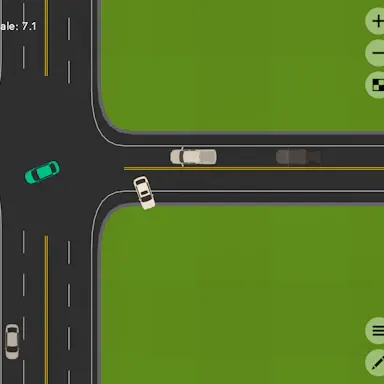
Road Designer hands you the job of a city planner. You draw roads, build junctions and set up one-way streets, then watch vehicles make their way through the network you made. Each level works like a puzzle about keeping traffic moving well.
Planning roads that work
Road Designer is about building, not racing. You lay down the streets yourself, decide where they cross, and choose which ones only allow traffic in one direction. Once a layout is ready, cars start to follow it, and you can see at once whether your plan holds up. Careful planning is what keeps the vehicles flowing instead of piling up.
Every level is a traffic puzzle
Each stage gives you a new challenge in managing how cars get around. There is room to be creative, since you can come up with your own layouts rather than follow a set answer. The game suggests trying several designs to find the one that moves traffic best, so expect to experiment.
Moving around the map
The controls are simple. WASD pans the view, and either the arrow keys or the mouse wheel handle zoom. Pressing G turns on grid snapping, which helps when you want neat, straight roads. If you want a closer look, tap the steering wheel icon and drive along your own streets.
Tips
- Try more than one layout and compare how the traffic behaves.
- Use grid snapping to keep junctions tidy.
- Link up paths the way a city road map would.
- Watch the cars after each change to see what helped.
Who it suits
Road Designer suits players who enjoy building, planning and puzzle solving. It is free on webgames.tv and runs in your browser.
- Controls
- WASD moves around the map, the arrow keys or scroll wheel zoom, G turns grid snapping on, and tapping the steering wheel icon lets you drive.
- Developer
- itsnotmark
- Category
- Strategy
- Tag
- Building
- Orientation
- landscape
FAQ
- What is the goal in Road Designer?
- To plan a road layout that lets the vehicles get through smoothly on each level.
- How do I move the camera?
- Use the WASD keys to move and the arrow keys or the scroll wheel to zoom.
- What does the G key do?
- It switches on grid snapping, which keeps your roads lined up on a grid.
- Can I drive on my own roads?
- Yes. Tap the steering wheel icon to take a car out on the network.