Drop Planets
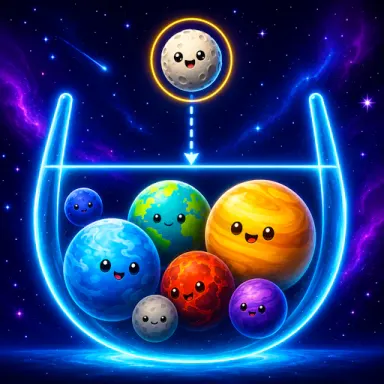
Drop matching planets together to form super-planets in Drop Planets, and keep the pile below the danger line before the galaxy collapses.
Đọc thêm về Drop PlanetsThêm game Giải đố
Tất cả game Giải đố TenTrixGiải đố
 Mahjong ClassicGiải đố
 Prism Match 3DGiải đố
 My Parking LotGiải đố
 Hidden Object: Clues and MysteriesGiải đố
 2048 X2 Merge BlocksGiải đố
 100 Doors - Escape from PrisonGiải đố
 2048Giải đố
 Hidden Object: Street Of SecretsGiải đố
 Hidden Objects: Island SecretsGiải đố
 Explainable MinesweeperGiải đố
 Good Sort Master: Triple MatchGiải đố
Về Drop Planets
Drop Planets is a merging puzzle from kobadoo. You release planets one at a time, and two that match combine into a bigger super-planet. The pile has to stay below the danger line, or the whole galaxy collapses and the attempt is over.
Merging is how you make room
In Drop Planets, space is the thing you are always short of. Every planet you release takes up room, and the only way to win room back is to merge: two matching planets that meet turn into a single, bigger super-planet. That is why the game’s one hint matters so much. Release a planet close to one of the same kind and the pair merges the moment they touch, which frees space instead of using it up.
Watching the danger line
The other half of the game is the line near the top of the screen. While the planets stay below it the galaxy holds together; let the pile climb past it and the galaxy collapses. Every drop is therefore a small decision about where the next planet will do the least harm and the most good, and a careless one adds height without taking any away.
Aiming on a keyboard or a screen
On a computer the planet waiting to fall is steered with the arrow keys and released with Space, while R starts a fresh attempt and P pauses when you need a moment. On a phone you hold, slide the planet into place and let go. Either way, aiming is the whole game: a planet placed well merges and clears space, and a planet placed badly simply sits there and brings the line closer.
Tips
- Look for a matching planet before you drop, not after.
- Keep the stack low and even, so there is always somewhere safe to land.
- Pause with P when the screen gets busy and plan the next few drops.
- Điều khiển
- On a computer, the arrow keys move the planet you are holding and Space drops it, with R to retry and P to pause or resume. On a phone, hold and slide to move the planet, then let go to drop it.
- Nhà phát triển
- kobadoo
- Thể loại
- Giải đố
- Nhãn
- Giải đố
- Hướng màn hình
- dọc
Hỏi đáp
- How do planets merge in Drop Planets?
- Two matching planets that touch become one bigger planet. The game's own hint is to drop each planet near a match so that they merge on contact.
- How do you lose?
- By letting the planets pile up past the danger line. When that happens the galaxy collapses.
- Can you pause or start again?
- Yes. On a computer P pauses and resumes the game, and R retries.