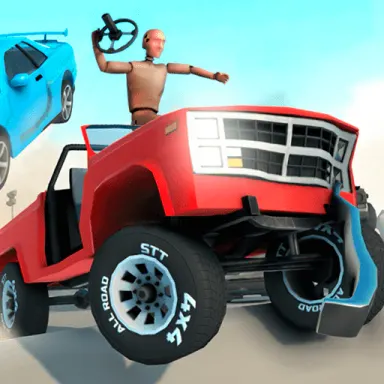
Car Crash Test
Smash cars on purpose with realistic 3D physics, earn coins from every wreck and buy more cars to break. Every key explained, from nitro to camera.
อ่านเพิ่มเติมเกี่ยวกับ Car Crash Testเกม อาร์เคด เพิ่มเติม
เกม อาร์เคด ทั้งหมด Worms Zoneอาร์เคด
 Spinning Oia Oia Cat Brickerอาร์เคด
 Strike Galaxy Attackอาร์เคด
 Snake 2048.ioอาร์เคด
 Alpha Gunsอาร์เคด
 Stick Mergeอาร์เคด
 Tiny Tombอาร์เคด
 Bricks Breaker Deluxeอาร์เคด
 Brick Breaker Classic Arcade Funอาร์เคด
 Hookอาร์เคด
 Cube Zone Masterอาร์เคด
 Worm Hunt - Snake game iO zoneอาร์เคด
เกี่ยวกับ Car Crash Test
Car Crash Test, by just-play, hands you a car and one question to answer: how much punishment can it take? The description promises realistic physics and 3D graphics, and every wreck pays coins toward the next car you want to destroy.
Crash, collect, repeat
The game sums itself up as a loop of four steps. Wreck a car, collect coins for doing it, spend those coins on more cars and cards, then go out and wreck again. The pitch rests on the physics, which the developer calls realistic, and the stated aim is to test how strong a car really is by breaking it in as many different ways as you can think of.
Driving and the camera
Cars use the familiar layout of WASD or the arrow keys. Space applies the handbrake, and Left Shift fires the nitro, which the control list marks as being for advertising. The camera has more than one view. Press C to switch between them, and in the standard view the mouse turns the camera, which is how you pick the side of the car you want to watch as it hits something.
The on-screen buttons
Three buttons sit on the game screen: level reset, main menu and time dilation. Each one has a key as well, R, H and T in that order, and the game itself points out that the keyboard is the more convenient way to use them. Clicking works too, but the pointer is not always showing. Press Escape or Tab first to make it visible, and the buttons can then be clicked like any others.
Getting the most from a session
Because coins come from crashing, every wreck earns something toward the next purchase. R is the quickest route to another attempt, since it resets the level without a detour through the menu, and H takes you back to the main menu when you are finished with a level. T switches on what the game calls time dilation.
- การควบคุม
- Drive with WASD or the arrow keys, pull the handbrake with Space and use nitro on Left Shift, which is listed as being for advertising. C changes the camera view, R resets the level, H goes to the main menu and T is time dilation. Press Escape or Tab to show the mouse pointer.
- ผู้พัฒนา
- just-play
- หมวดหมู่
- อาร์เคด
- แท็ก
- อาร์เคด
- การวางแนว
- แนวนอน
คำถามที่พบบ่อย
- How do you earn coins in Car Crash Test?
- By crashing. Every wreck pays out coins, and you spend them on new cars and cards before heading back out to crash again.
- How do I get the mouse pointer back?
- Press Escape or Tab. That makes the cursor visible, so you can click the buttons on the game screen.
- Can I change the camera?
- Yes. C switches the camera view, and in the standard view you can also turn the camera with the mouse.